顯示具有 不爽 標籤的文章。 顯示所有文章

2025年9月23日 星期二

Brave Browser Extension issue in Windows

 !說在前面, brave browser 這個問題是 windows 特有!

問題的現像為 extension 無法下載, 無法載入, 無法執行.

目前的結論, 問題發生的主因是 %TEMP% 目錄下 brave browser 無權執行.


個人使用 chromium base web browser (brave, vivaldi) 有個習慣是把整個 user-data-dir 丟上 RAMdisk 裡跑, vivaldi 叫 "%LOCALAPPDATA%\Vivaldi\User Data", brave 叫 "%LOCALAPPDATA%\BraveSoftware\Brave-Browser\User Data", 因為 extension 跑的資料也會在這區裡運作, 間接會變的很會磨 SSD 寫入次數, 所以個人把這目錄重導向到 IMdisk 建的 RAMdisk 裡使用有一段時間, 也是到最近發現 brave browser 開始出問題才注意到. (chrome 也會有一樣的 extension 的問題, 但 vivaldi 到目前都很正常).

然後我花了很多時間交叉測試後, 最後才找到原來跟暫存目錄有關係. 我有使用兩個 RAMdisk 軟體, 一個是 DATARAM RAMdisk 一個是 IMdisk, 而 %TMP% %TEMP% 都是指到 IMdisk 去, 而 brave 大約從 1.79 版開始, %TMP% %TEMP% 這裡就會有無法存取的問題, 一開始只是無法再安裝新 extension, 到後來會連載入都無法載入. 這時剩一個能用的方法, 就是在啟動 brave browser 時, 把這個 app 的 %TMP%, %TEMP% 全部重新導向:

!!b:\tmp 是 DATARAM 的 RAMdisk, 不是 IMdisk 的, 特別注意.!!

--

C:\Windows\System32\cmd.exe .exe /c "set TEMP=B:\tmp&&set TMP=B:\tmp&&start brave"

--

無痕就用
C:\Windows\System32\cmd.exe .exe /c "set TEMP=B:\tmp&&set TMP=B:\tmp&&start brave --incognito"

--

這樣 extension 才能正常跑. 而且請注意, 這樣是 brave 安裝在 %ProgramFiles% 下的才可以成功指定, 裝在 %LOCALAPPDATA% 裡的以上方法無效.


而且, brave browser 長年以來很莫明奇妙一點就是 linux 底下都很正常, windoz 下怪問題一堆.


update:

是這一區權限有問題:

%LOCALAPPDATA%\BraveSoftware\Brave-Browser\User Data\Default\Extensions

為了讓 extensions 可以正常運作, 只好把這區全 junction 到真正的 RAMdisk 裡或其它 fixed disk 裡運作.


update: 2025/11 這時間左右的 update 修掉這個問題, 反而換 yahoo 拍賣爛掉了. yahoo拍賣的問題就不關RAMdisk的事了.

2024年4月10日 星期三

Windows update without driver

我想這已經很多人都知道了. 除了 AMD GPU driver 以外, 有安裝 Intel 官方網站下載的 driver 也建議打開, 例如 vmware workstation/player 會因為 M$ windows-update 給的 driver openGL 有問題, 開起來直接藍底白字. (個人沒很信任 WHQL 的品質, intel driver 品質江河日下的今天它可以比 intel 或 AMD 都還要糟糕....)


2022年9月26日 星期一

阻擋 ubuntu 土匪式的 update

 這我很久以前就這樣設定了, 直到最近被搞到有一臺機器開不了機, 我才發現原來我沒貼在這.

/etc/apt/apt.conf.d/20auto-upgrades

APT::Periodic::Update-Package-Lists "0";
APT::Periodic::Download-Upgradeable-Packages "0";
APT::Periodic::AutocleanInterval "0";
APT::Periodic::Unattended-Upgrade "0";

即使不會開不了機, 也會把你 /boot 區塞爆, rootfs 裡每一個版本就給你塞 2xxMiB (btrfs 壓縮後的大小) 的空間, 塞到你爆炸為止.


2022年5月25日 星期三

re: baytrail linux freeze bug..

 我從沒有想到過 baytrail 的奮戰篇可以寫到第 4篇, 真的是我人生中用過問題最多的 CPU..

繼上一篇 baytrail linux freeze bug.. 之後, 原本以為應該不會再有問題的組合, 到了 kernel 5.13 忘記哪一版後又開始繼續, 這次也很刺激, disable USB suspend, c_state 這些以前試過的 workaroun 全部沒用了, 只要重載負荷幾天, 就是死給你看. 這次想到的解法是原本用在 sheeva plug 上的一篇筆記, 虛擬桌面. 目前實驗重載幾十天都還沒出事, 先來筆記.

先說在前面, 這次的做法就是完全關掉內建顯示, 只能用遠端桌面操作. 所以在這之前 VNC server 的部份一定要先搞定, 沒把握搞定 VNC server 也得把 serial port console 打開以防萬一..

這是根據前人在 ubuntu 18.04 的筆記實做, 個人測試到 22.04 都有效. 首先的先安裝最關鍵的套件: xserver-xorg-video-dummy

然後在 /usr/share/X11/xorg.conf.d/xorg.conf 中設定:

Section "Device"
Identifier "Configured Video Device"
Driver "dummy"
VideoRam 32768
EndSection

Section "Monitor"
Identifier "Configured Monitor"
HorizSync 31.5-166
VertRefresh 50-152
EndSection

Section "Screen"
Identifier "Default Screen"
Monitor "Configured Monitor"
Device "Configured Video Device"
DefaultDepth 24
SubSection "Display"
Depth 24
Modes "1920x1200" "1920x1080" "1600x1200" "1680x1050" "1440x900"
EndSubSection
EndSection

後, 下次重啟桌面環境 (xubuntu 是 systemctl restart lightdm) 後就會套用這個虛擬桌面設定, 在這裡面要上網要跑 vmware workstation 都沒問題, 而且因為是純軟體不會用到硬體 GPU, 可以省下 GPU 耗費的電力, 想要在一些本來就沒內建顯示的機器上跑 GUI 界面的桌面可以考慮用這種方式操作, 也不需要擔心被吃掉太多可用記憶體 (j1900 graphic 預設會吃掉 2GiB..).


關掉 baytrail 那該死的 GPU, 目前看起來一切正常, 目前啦....


2020年10月26日 星期一

baytrail linux freeze bug..

首先先論述這個問題. kernel 3.13 以後的版本, 在 J1900 上跑幾天會自己 freeze 掉 (凍結, 沒有任何錯誤訊息, 就完全沒有反應), 特別容易發生在 1. 機器沒有接任何 USB keyboard/mouse 2.機器有跑 VMware workstation 而且虛擬機器內 CPU 開一顆以上. 3. J1900 CPU 上. 同為 baytrail 的 E3815/3825/3845 沒有這問題.

這個問題其實困擾我快 3 年了, 這 3 年間看過許多奇奇怪怪的解法在 J1900 上試都沒什用, 當然包括 intel 這篇文章的內容也沒有用. 而在 kernel 4.x 時代關 c-state 的繞路解 (intel_idle.max_cstate = 1, 還是 c-state patch) 會在 kernel 5.x 上失效.

在後來 kernel 5.x 時代的 ubuntu 18.04 & 20.04 上, kernel 不需要下任何東西, 也不用下 c-state patch 就可以正常運作, 但要排除我一開始寫的兩個問題, 就沒事. 機器可以開好幾天都很正常, 但只要 VM workstation 開下去, 約 84 小時內就會 freeze. 有時快一點 4 小時以內就死.

這時我的建議, host OS kernel parameter 加上 "usbcore.autosuspend=-1", 也就是 /etc/default/grub 裡 "GRUB_CMDLINE_LINUX=" 這裡加上去, 如 "GRUB_CMDLINE_LINUX=usbcore.autosuspend=-1". 其它都不用加.

還有機器上請乖乖插上一隻 USB keyboard 或 mouse, 只要機器還認的到它是 USB HID 裝置就可以, 不需要可以正常使用, 不需要沒事去動它.


short for english version. added "usbcore.autosuspend=-1" to kernel parameter at boot (may insert this to grub..), and plug one USB HID device, such like keyboard, or mouse. and don't using any ACPI c-state patch..

update 2020/11/09: usbcore.autosuspend=-1 不用加, 而 USB kb | mouse 一定要接.

2020年8月29日 星期六

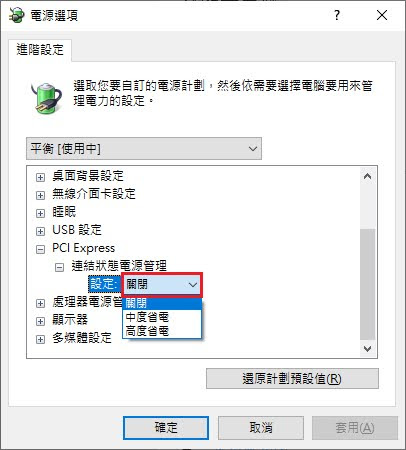
RX580 resume 後 DP 無信號

 現在控制台裡沒有 hybrid power (?) 的選項可用, 我只好找 forum 裡講的 PCI power control 改改試試看, 目前看起來好像有用


是不是真的 100% 解, 我不確定, RX580 之前 DVI suspend 回來畫面會花掉的問題一直都沒解掉過, AMD 也擺爛根本不想解這問題, 所以我不確定這樣做是不是真的有用.

2020年8月21日 星期五

windord normal.dot 已開啟的錯誤

 我覺得這問題要歸咎於 windows IO 性能低落的太可怕引起的問題...

del C:\Users\%username%\AppData\Roaming\Microsoft\Templates\~*.*

ps.還有一個檔案要砍,但我現在臨時找不到,找到我再貼上來..........

2019年3月7日 星期四

disable ubuntu automatic OS update

/etc/apt/apt.conf.d/20auto-upgrades

APT::Periodic::Update-Package-Lists "0";
APT::Periodic::Download-Upgradeable-Packages "0";
APT::Periodic::AutocleanInterval "0";
APT::Periodic::Unattended-Upgrade "0";
土匪式的更新這方面 ubuntu 並沒有比 Windows 有比較好. 凸-_-凸

2019年2月14日 星期四

VMware workstation 12.5 with ubuntu 18.04, kernel 4.18

VMware workstation is good, when I moved to ubuntu 18.04 and change kernel to 4.18.0, still work fine. but some trouble after installed software. please reference here:https://bugs.launchpad.net/ubuntu/+source/linux/+bug/1715552

When installed VMware workstation or player, do this:

# git clone https://github.com/mkubecek/vmware-host-modules.git
# cd vmware-host-modules
# git checkout workstation-12.5.9
# make;make install
# cd /usr/lib/vmware/lib/libz.so.1
# mv libz.so.1 libz.so.1.old
# ln -s /lib/x86_64-linux-gnu/libz.so.1 
# systemctl restart vmware


x

"Failed to get gcc information"

re-build vmware workstation / player kernel module by
vmware-modconfig --console --install-all

but, when you got this message, you should re-make kernel module:
"Failed to get gcc information"

# git clone https://github.com/mkubecek/vmware-host-modules.git # cd vmware-host-modules # git checkout workstation # make;make install # systemctl restart vmware

user is root.


2018年12月11日 星期二

RHEL initrd 裡加 driver

例如 USB storage, AHCI, NVMe 這些東西..
dracut -v -f --add-drivers "ahci libahci libata usb_storage uas nvme nvme_core" -f /boot/initramfs-$(uname -r).img $(uname -r)

不過我真的很不想再碰 RHEL, 不管是 distro 本身還是用它的人.

2018年5月10日 星期四

`linux-update-symlinks` is not available.

一如 bug report 所說, 是 linux-base 這個套件有少東西, 須要升級. 但是沒有講要升到哪一版. 我測試的結果是必需要 4.5 (4.5ubuntu1)開始才有:
https://packages.ubuntu.com/bionic/linux-base

google 到的都是一堆廢話, 就是沒有寫怎麼解. 下載上面那個安裝包裡的東西再 dpkg -i 就可以了.

2018年3月19日 星期一

android ignore imgdiff

when build system image (target command "systemimage") got the shit message:
"failed to break apart source image"
fuck it!

modify the code to ignore this idiot work:
"bootable/recovery/applypatch/imgdiff.cpp"
int main(int argc, char** argv) {
   int zip_mode = 0;
+   return 0; //return "success" direct, don't do anything stupid.
...
}

I don't know why added garbage work here, may guess CPU toooo fast? fuck..


2017年9月19日 星期二

apt force remove

dpkg --purge --force-all package

if package had newer version, idiot 'apt-get remove' will install newer version package then remove old version (like kernel), equal not do remove. so we need using dpkg with --force-all command remove it enforce

2017年9月13日 星期三

X compact 的相機爛到一個不可思議...

我的應用非常簡單, 拍一個啟動電容而已, LED 為手電筒模式, 常開... 有連續光源打光的情況下都可以把快門設到 1/32s, ISO 降低到 250 造成拍攝晃動, 我真的無法再忍受這麼爛的設計決定貼上來...


 我原本以為啟動電容不會壞, 我錯了. 我一直都知道 X compact 的相機很爛, 沒想到是這麼的爛到不可思議的爛

2017年8月28日 星期一

WEC7 wave 3

Windows Embedded Compact 7 wave 3 update (2017/06)
en_windows_embedded_compact_7_december_2014_x86_x64_dvd_6315546.iso
自己找....

不要再來找我要啥 CE 的 service, 我只會回給你十個字, 去死吧去死吧去死吧幹

2017年5月13日 星期六

Windows 7 update 80080005

參考文章
https://www.ptt.cc/bbs/Windows/M.1348851971.A.FD7.html

講重點.
start -> search -> type "CMD" -> mouse right key click "Run as Administrator" -> terminal
"fsutil resource setautoreset true c:\"
work with did reboot.

download and install readiness tool, KB947821:
https://www.microsoft.com/en-us/download/details.aspx?id=3132

done.

2017年4月16日 星期日

debug

ACPI/PNPA000
這是 alcohol 52% virtual device (alcohol iSCSI), 所以一定找不到它的 driver...

google 能找到答案的問題都不叫問題, google 找不到答案的問題一樣一堆, 叫我去 google 我他媽的一定翻臉給你看

2017年3月31日 星期五

[Win32] 阻止 winsock.h

compile 多加一個定義 _WINSOCKAPI_
可以有效阻止 include windows.h 時順路把 winsock.h (不是 winsock2.h) include 進來 -_-
王八蛋......

2017年1月24日 星期二

firefox multi-process

After 11 years of first multi-core x86 processor, yes, 11-years, firefox start to supported multi-processor, even only supported two of processor.

reference from here:
http://www.ghacks.net/2016/07/22/multi-process-firefox/


  1. Enable electrolysis
    • in firefox "about:config"
    • search "browser.tabs.remote.autostart"
    • setting to "true"
  2. Tabs remote enable:
    • in firefox "about:config"
    • search "browser.tabs.remote.force-enable" (if not, create it, boolean)
    • setting to "true"
  3. Accessibility enable:
    • in firefox "about:config"
    • search "accessibility.force_disabled"
    • setting to "0"
  4. Check:
    • in forefox "about:support"
    • see option "Multiprocess Windows"
but, even now, I only see two of firefox task in the task-manager.